Profit
Profit and the Finance screen
How LumiPoints walks from revenue to the profit your shop really kept, and why it differs from what Etsy shows.
The problemEtsy shows what you earned, not what you kept.
What you getProfit for the shop and for every order, after every Etsy fee, product cost and shipping label.
Sounds like you?
- Etsy says I earned a lot, my bank account disagreesWhy is my profit so different from Etsy's “You earned”?
- My revenue looks lower than in EtsyWhy is my revenue lower than Etsy's number?
- My shop is in the UK or the EUWhat is the tax on Etsy's fees?
- My accountant wants numbersCan I use LumiPoints for taxes?
01What does the Finance screen show?
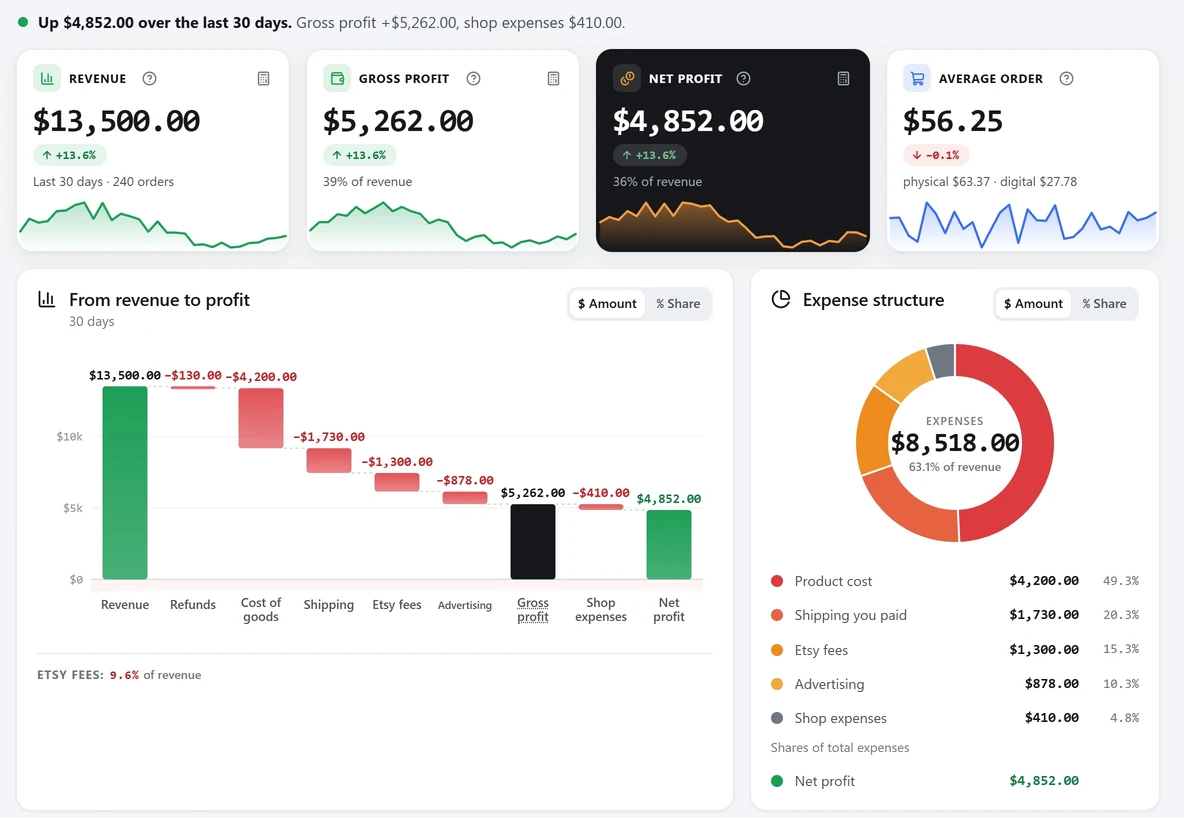
Your money from revenue down to net profit, step by step: revenue, refunds, product cost, the shipping you paid, Etsy fees, advertising and your own shop expenses. At the top are revenue, gross profit, net profit and the average order, each compared with the previous period. A waterfall shows where the money went and every view uses the same numbers, so they always agree.
02Why is my profit so different from Etsy's “You earned”?
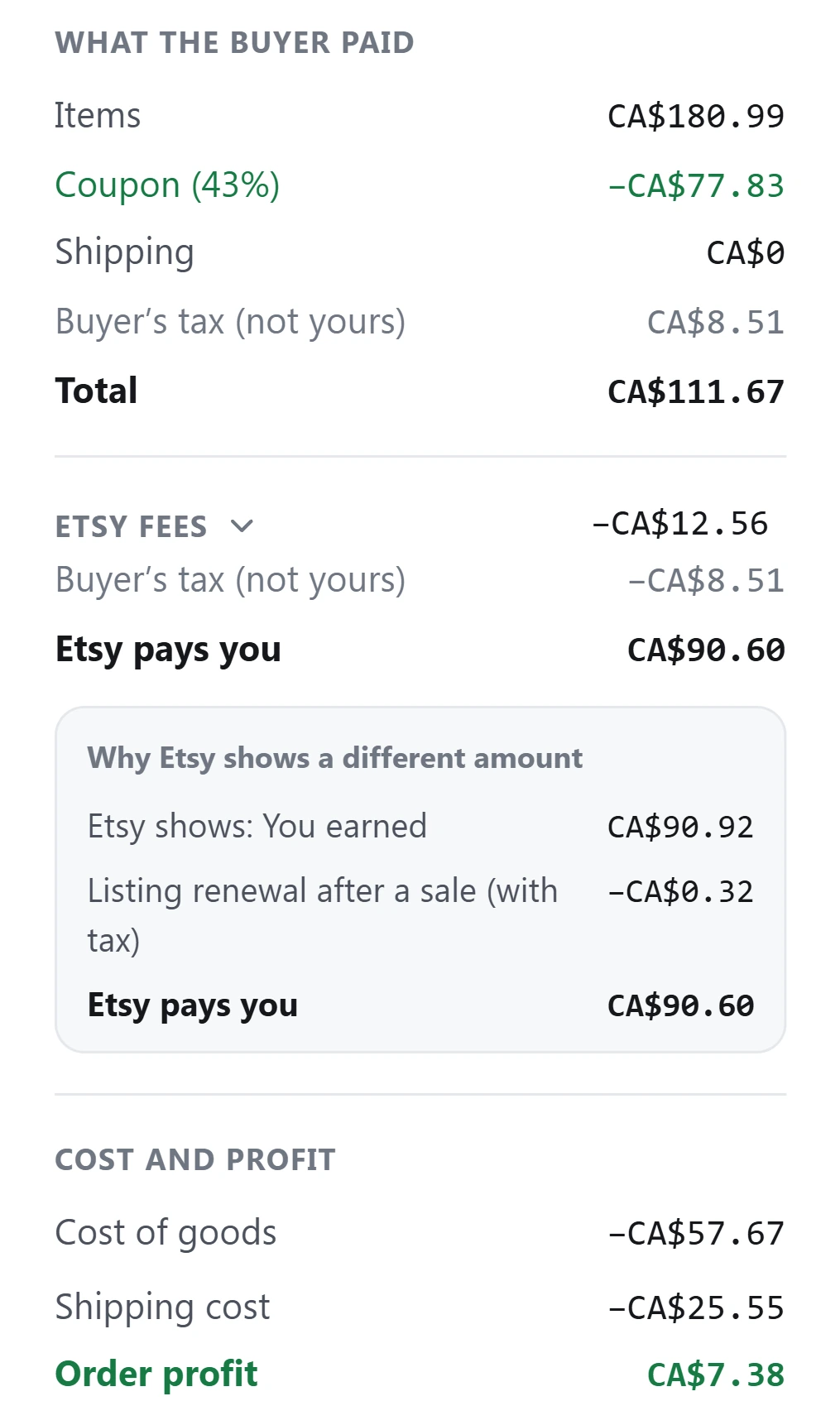
Etsy's “You earned” stops after Etsy's own fees. Etsy never learns what the item cost you to make or to ship, so it cannot show profit. In one real order an item listed at CA$180.99 sold with a 43% coupon, Etsy showed “You earned CA$90.92”, and after the product cost and the shipping label the shop kept CA$7.38. Each order in LumiPoints also explains why “You earned” differs from what Etsy actually paid out.
Example
One real order, in Canadian dollars
Listed at CA$180.99 and sold with a 43% coupon.
- Etsy says you earnedCA$90.92
- Listing renewal after the sale−0.32
- What the product cost−57.67
- What the shipping cost−25.55
- What the shop keptCA$7.38
From the founder's own shop. Etsy's number stops at the first line, because it never learns the cost.
03Why is my revenue lower than Etsy's number?
LumiPoints counts revenue without the buyer's sales tax. Etsy collects that tax from the buyer and passes it to the tax office; it goes through your account but is never your money. Counting it would inflate your sales and your margin. Your profit is the same either way.
Link to this answer04Which costs are counted?
Everything that leaves your pocket: the product cost (from Printify or entered by you), the shipping you pay, every Etsy fee on its own line (transaction, payment processing, listing and renewal, the regulatory operating fee, currency conversion, shipping labels), Etsy Ads and Offsite Ads, the tax Etsy charges on its fees, and your own expenses such as software. The buyer's sales tax is left out because it is not yours.
Link to this answer05What is the tax on Etsy's fees?
If your shop is in the UK or the EU, Etsy adds VAT, about 20%, on top of its own fees. That money really leaves your pocket, so LumiPoints counts it as an expense on its own line. It is different from the buyer's sales tax, which LumiPoints leaves out.
Link to this answer06What if a product has no cost yet?
LumiPoints lists every product that still needs a cost and marks the profit as incomplete until you add it. While some paid orders have no cost, the Finance screen says so: those orders are counted without a product cost, so their profit looks better than it is. Add the cost once and every past order is recounted. Digital items need no cost.
Link to this answer07Can I add my own expenses?
Yes. Add monthly or one-time expenses, such as design software or an assistant, with a category. They are taken off your order profit, so net profit shows the whole business, not only the orders.
Link to this answer08Can I use LumiPoints for taxes?
No. LumiPoints is an operating profit and loss for running your shop. It is not accounting, tax or financial advice. You can export your numbers to share them with your accountant.
Link to this answerStill a question? Write to [email protected]. A person answers.